나노바나나 이미지 생성 프롬프트 가이드 PART 2
오늘은 PART 1에 이어서 PART 2로 이미지를 수정하는 기능들을 알아보도록 하겠다.
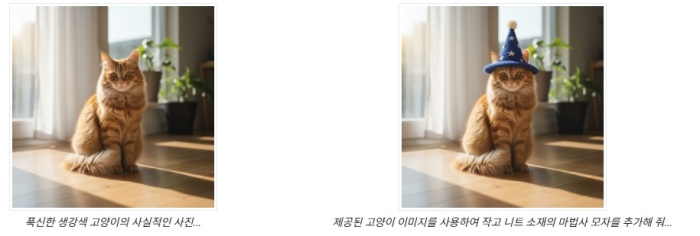
1.요소 추가 및 삭제
이미지를 제공하고 변경사항을 설명한다. 모델은 원본 이미지의 스타일, 조명, 원근법과 일치한다.
| 프롬프트 |
| "Using the provided image of my cat, please add a small, knitted wizard hat on its head. Make it look like it's sitting comfortably and matches the soft lighting of the photo." |
2.인페인팅 (시맨틱 마스킹)
대화형으로 '마스크'를 정의하여 이미지의 특정 부분을 수정하고 나머지는 그대로 유지한다.
| 프롬프트 |
| "Using the provided image of a living room, change only the blue sofa to be a vintage, brown leather chesterfield sofa. Keep the rest of the room, including the pillows on the sofa and the lighting, unchanged." |

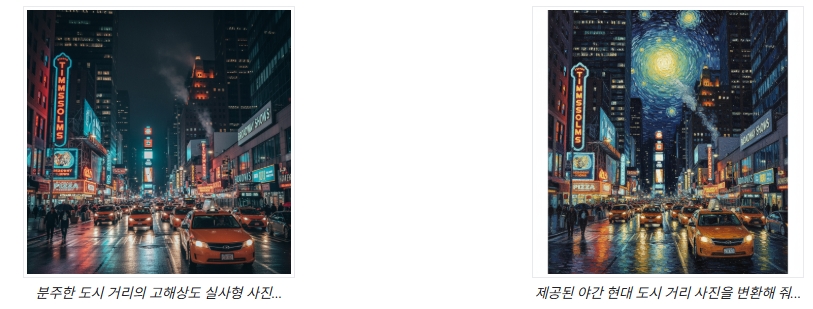
3.스타일 전이
이미지를 제공하고 모델에 다른 예술적 스타일로 콘텐츠를 다시 만들도록 요청한다.
| 프롬프트 |
| "Transform the provided photograph of a modern city street at night into the artistic style of Vincent van Gogh's 'Starry Night'. Preserve the original composition of buildings and cars, but render all elements with swirling, impasto brushstrokes and a dramatic palette of deep blues and bright yellows." |
4.고급 구성 : 여러 이미지 결합
여러 이미지를 컨텍스트로 제공하여 새로운 합성 장면을 만든다.
제품 모형이나 창의적인 콜라주에 적합하다.
| 프롬프트 |
| "Create a professional e-commerce fashion photo. Take the blue floral dress from the first image and let the woman from the second image wear it. Generate a realistic, full-body shot of the woman wearing the dress, with the lighting and shadows adjusted to match the outdoor environment." |

5.충실도 높은 세부정보 보존
편집 중에 얼굴이나 로고와 같은 중요한 세부정보가 보존되도록 하려면 편집 요청과 함께 세부 정보도 자세히 설명한다.
| 프롬프트 |
| "Take the first image of the woman with brown hair, blue eyes, and a neutral expression. Add the logo from the second image onto her black t-shirt. Ensure the woman's face and features remain completely unchanged. The logo should look like it's naturally printed on the fabric, following the folds of the shirt." |

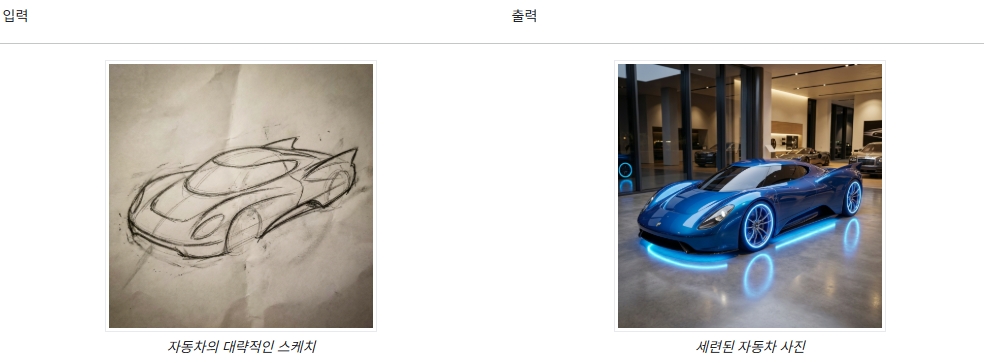
6.생기를 불어넣기
대략적인 스케치나 그림을 업로드하고 모델에 완성된 이미지로 다듬어 달라고 요청한다.
| 프롬프트 |
| "Turn this rough pencil sketch of a futuristic car into a polished photo of the finished concept car in a showroom. Keep the sleek lines and low profile from the sketch but add metallic blue paint and neon rim lighting." |
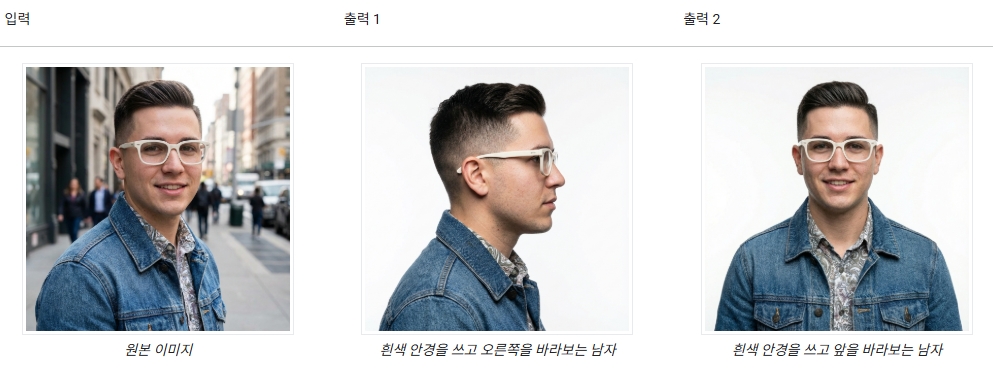
7.캐릭터 일관성 : 360도 뷰
다양한 각도를 반복적으로 요청하여 캐릭터의 360도 뷰를 생성할 수 있다.
최상의 결과를 얻으려면 일관성을 유지하기 위해 이전에 생성된 이미지를 후속 프롬프트에 포함시킨다.
복잡한 포즈의 경우 원하는 포즈의 참조 이미지를 포함한다.
| 프롬프트 |
| A studio portrait of this man against white, in profile looking right |
이미지 생성 뿐 아니라 기존 이미지를 수정,변형하는데도 많은 도움을 준다.
꼭 한번 활용해보시길 바란다.
반응형
'AI 정보' 카테고리의 다른 글
| 나노바나나 이미지 생성 프롬프트 가이드 PART 1 (0) | 2026.01.14 |
|---|---|
| 무료로 다양한 인공지능 AI 모델을 사용할 수 있는 LMArena (0) | 2025.12.19 |
| 구글에서 새로 만든 비밀병기! 믹스보드 (0) | 2025.11.08 |
| 그록, 이매진 기능 사용 후기 (0) | 2025.11.04 |